GUIDE / 01 · CONTROLS
Taipei Rush
keyboard controls.
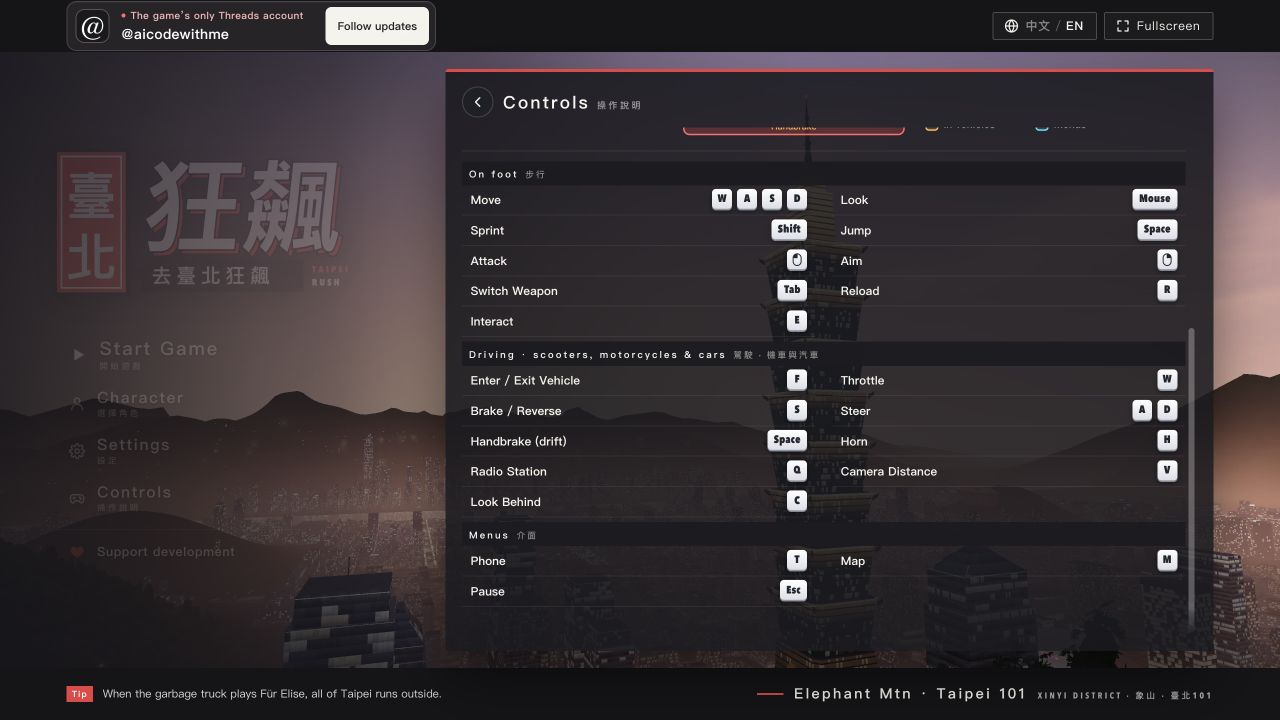
This reference follows the keyboard mapping visible in the game's current public code and menu. Versions and devices can differ, so test a key once in a safe place after loading.
Movement and driving
WForward / throttle
SReverse / brake
A DLeft and right / steering
FEnter / exit vehicle
EInteract
ShiftSprint
SpaceJump / handbrake
Interface and city
MMap
EscPause
HHorn
QRadio
VCamera
CLook behind
TIn-game phone
TabSwitch weapon
RReload weapon
Mobile and controller
The original game page shows Keyboard&Mouse, Gamepad, and Touch tabs. Its Touch prompt describes a left virtual stick for movement and right-side dragging for the view. This records the game's support UI, not a hardware test or a button map; read the mobile guide for the loading limits.
If a key does nothing, click inside the game so the iframe receives keyboard focus. A "document loaded" message does not mean every 3D asset has finished loading; wait a little longer when the connection is slow. Source: original game page.